
Core Current Open Items
The TAL table below displays workflow items that may require user attention.
NOTE: Items in the repair lists are suspended. They are not included in reporting, rebate calculations, or government pricing calculations.
To review the workflow items, select the GO button.
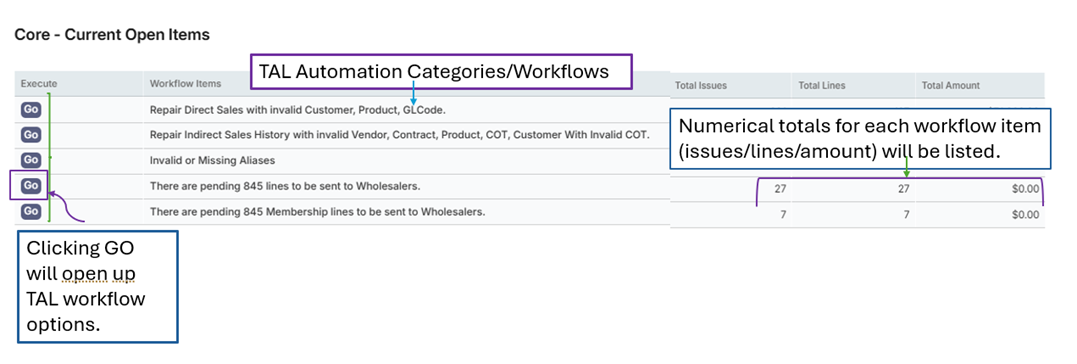
Invalid or Missing Aliases
The Invalid or Missing Aliases workflow alerts users to potential alias issues that may affect processing in other areas of iContracts.
The Invalid or Missing Aliases workflow will allow the user to view and manually repair Invalid or Missing Aliases.
iContracts recommends that this list be reviewed periodically to ensure accurate and up-to-date information and prevent downstream problems in other iContracts modules.
When repairing, move through the error tabs from left to right, beginning with resolving the VendorHQ Without Internal error and continuing to move through any other applicable tabs.
Vendor HQ Without Internal -> Vendor HQ With Multiple Internals -> Products Without Internal
Products With Multiple Internals -> Vendor Children Without Internal
Vendor Children With Multiple Internals -> Vendor Children Without DEA -> Products Without NDC4 BGs/Contracts With DEA -> BGs/Contracts With HIN -> Non Products With NDC4
Product With Multiple NDC4 -> Purchasers Without DEA/HIN/GLN/EXTERNAL/340B
Vendors With Multiple Parent IDs -> Vendor Parent Without Children -> Vendor Children Without Parent
Alias Assigned to More Than One Customer -> Active Product Without Active WAC
Contract Price Higher Than WAC -> Invalid DEA
Headings that do not require attention cannot be interacted with, and on hover, will show a cancel icon, pictured below, and will be greyed out.
Headings that require attention will be highlighted in dark gray.
Clicking the link will bring you to the related repair screen.
Vendor HQ Without Internal
The VendorHQ Without Internal tab displays vendor parents that were created without an Internal Reference ID.
The Vendor HQ is also referred to as Vendor Parent or Vendor Bill To.
The Vendor HQ Internal Alias is included in AR/AP and EDI849 interface files.
If the Internal ID is missing, transactions may not flow correctly to your billing system and interfaces will not include an ERP ID as one is not currently attached as an internal identifier.
This tab will display any VENDOR type customers with the level set to PARENT, but an internal reference type was not established on the Customer Header.
To fix the customer set up, click OPEN. The iContracts module will automatically open the aliases associated with the customer.
To resolve, you can either modify an existing alias by clicking on CHANGE next to the desired alias.
This will give you the option to edit. Select INTERNAL from the Reference Type dropdown, then hit SAVE.
Alternatively, a new alias can be added by clicking on the ADD NEW ALIAS button.
Add in the desired Reference ID, select Reference Type INTERNAL from the drop down, then hit save.
Note: The internal ID should be the ERP ID for the customer.
Products Without Internal
The Products Without Internal tab displays products that were saved without an Internal Reference ID.
The Product Internal Alias is included in AR/AP and EDI849 interface files.
If the Internal ID is missing, transactions to your billing system may not flow correctly and interfaces will not include a product ERP ID as one is not currently attached as an internal identifier.
This tab will display any products where an internal reference type was not established on the Product Header.
To fix the product set up, click OPEN. The iContracts module will automatically open the aliases associated with the product.
To resolve, you can modify an existing alias by clicking on CHANGE next to the desired alias, selecting INTERNAL on the Reference Type drop-down, and hit SAVE.
Alternatively, you can add a new alias, by clicking the ADD NEW ALIAS button.
Add in the desired Reference ID and select INTERNAL from the Reference Type drop-down.
Then hit SAVE.
Vendor Children Without Internal
The Vendor Children Without Internal tab lists vendor children created without an Internal Reference ID.
Vendor Children are also referred to as Vendor Ship To Location or Branches.
The Vendor Child Internal Alias is included in AR/AP and EDI849 interface files. If the Internal ID is missing, transactions may not flow correctly to your billing system and interfaces will not include an ERP ID as one is not currently attached as an internal identifier.
This tab will display any VENDOR type customers with the level set to CHILD, but an internal reference type was not established on the Customer Header.
To fix the customer set up, click OPEN. The iContracts module will automatically open the aliases associated with the customer.
To resolve, you can either modify an existing alias by clicking on CHANGE next to the desired alias.
This will give you the option to edit. Select INTERNAL from the Reference Type dropdown, then hit SAVE.
Alternatively, a new alias can be added by clicking on the ADD NEW ALIAS button.
Add in the desired Reference ID, select Reference Type INTERNAL from the drop-down, then hit save.
Note: The internal ID should be the ERP ID for the customer.
Vendor Children Without DEA
The Vendor Children Without DEA tab lists vendor children created without a DEA number, meaning that an alias with a Reference Type of DEA could not be found for the vendor child customer.
The Vendor Children DEA alias is included in AR/AP and EDI849 interface files. DEA is typically sent in the EDI844 interface to identify the debit memo server. If the DEA is missing, transactions may not flow correctly into your billing system.
Additionally, if a debit memo is uploaded/entered with the missing DEA, the application will flag the debit memo with an Invalid Wholesaler error.
To fix the customer setup, click OPEN. The iContracts module will automatically open the aliases associated with the customer.
Note: The DEA should be the current DEA number for the customer. The iContracts application does not validate or verify correct DEA/HIN values.
To resolve, you can either modify an existing alias by clicking on CHANGE next to the desired alias.
This will give you the option to edit. Select DEA from the Reference Type dropdown, then hit SAVE.
Alternatively, a new alias can be added by clicking on the ADD NEW ALIAS button.
Add in the desired Reference ID, select Reference Type DEA from the drop-down, then hit save.
Products Without NDC4
The Products Without NDC4 tab lists products created without an NDC4.
An NDC4 is required for Government Pricing and Medicaid processing.
The NDC4 ID should be the NDC11, with or without dashes, for the product.
If an NDC4 is not set as an alias, the product will not generate EDI85/EDI849 lines or be sent in the EDI845/849 interface.
If the product is Medicaid eligible, if it does not have an assigned NDC4 alias, when the monthly/quarterly AMP values are finalized, the text file will contain zeroes for the NDC.
Additionally, the product will not be available to add to any Medicaid invoices, because the application uses the NDC4 to identify the labeler code.
If the company code feature is being used, since the labeler code cannot be identified, the company code will not translate in reporting or interfaces.
To fix the customer setup, click OPEN. The iContracts module will automatically open the aliases associated with the customer.
To resolve, you can either modify an existing alias by clicking on CHANGE next to the desired alias.
This will give you the option to edit. Select NDC4 from the Reference Type dropdown, then hit SAVE.
Alternatively, a new alias can be added by clicking on the ADD NEW ALIAS button.
Add in the NDC with or without dashes in the Reference ID box, select Reference Type NDC4 from the drop-down, then hit SAVE.
BGs/Contracts With DEA
The BGs/Contracts With DEA tab lists BUYING GROUP type customers or CONTRACTS where an ID or alias has been identified with the reference type DEA.
A DEA should only be assigned to the Ship To Location for a customer, which would be either a VENDOR CHILD or PURCHASER type customer.
To fix the customer setup, click OPEN. The iContracts module will automatically open the aliases associated with the customer/contract.
To modify the existing problematic entry, click on the entry with the erroneous reference type DEA and adjust, if needed.
If the alias is a DEA and needs to be reassigned to a different customer, or is no longer needed, the entry can also be deleted by clicking on the DELETE button.
BGs/Contracts With HIN
The BGs/Contracts With HIN tab lists BUYING GROUP type customers or any contracts where an ID or alias has been identified with the reference type HIN.
A HIN should only be assigned to the Ship To Location for a customer, which would be either a VENDOR CHILD or PURCHASER type customer.
To fix the customer setup, click OPEN. The iContracts module will automatically open the aliases associated with the customer/contract.
To modify the existing problematic entry, click on the entry with the erroneous reference type HIN and adjust, if needed.
If the alias is a HIN and needs to be reassigned to a different customer, or is no longer needed, the entry can also be deleted by clicking on the DELETE button.
Non Products With NDC4
The Non Products with NDC4 tab lists entries that are not products but were identified to have a Reference Type NDC4 as a listed alias.
An NDC4 should only be assigned to products.
To fix the setup, click OPEN. The iContracts module will automatically open the aliases associated with the customer/contract.
To modify the existing problematic entry, click on the entry with the erroneous reference type NDC4 and adjust, if needed.
Alternatively, if the alias is not actually an NDC that needs to be attached to a product and does not need to be reassigned, the alias can be deleted by clicking on the DELETE button.
Purchasers Without DEA/HIN/GLN/EXTERNAL
The Purchasers Without DEA/HIN/GLN/EXTERNAL tab lists PURCHASER type customers created without a DEA, HIN, GLN, 340B or EXTERNAL alias or identifier.
A DEA or HIN is required for Chargeback customers, and all customers should have at least one assigned alias.
If a customer is not assigned an alias or ID, the ID will not appear in the EDI845 or EDI849 interfaces.
To fix the setup, click OPEN. The iContracts module will automatically open the aliases associated with the customer/contract.
Click on the ADD NEW ALIAS button to add at least one of the following aliases – DEA, HIN, GLN, or EXTERNAL.
Enter the desired Reference ID and select the appropriate Reference Type, then hit SAVE.
If an existing alias exists that needs to be updated, you can do so by hitting the SAVE button on the desired line and updating the reference type in the drop-down.
Contracts Without Internal
The Contracts Without Internal tab lists contracts created without an Internal Reference ID.
An internal contract alias is included in AR/AP and EDI849 interface files. If the Internal ID is missing, transactions may not flow correctly into your billing system.
To fix the contract setup, click OPEN. The iContracts module will automatically open the aliases associated with the customer/contract.
To resolve, you can either modify an existing alias by clicking on CHANGE next to the desired alias.
This will give you the option to edit. Select INTERNAL from the Reference Type dropdown, then hit SAVE.
Alternatively, if the desired internal alias does not exist, click ADD NEW ALIAS. Enter the desired reference ID, select INTERNAL from the Reference Type drop-down, then hit SAVE.
Vendor Parent Without Children
The Vendor Parent Without Children tab lists VENDOR PARENTS that do not have an established relationship with a VENDOR CHILD type customer.
The Vendor Parent/Child relationship is important for sales to flow to AR, AP, and EDI 845/849 interfaces, as well as rebates.
The system expects that a VENDOR type customer will have a PARENT (Bill To) and CHILD (Ship To). The EDI 844 will be sent at the child level, and the EDI 849 will be sent with both parent and child IDs.
If a VENDOR PARENT does not have an established relationship with a VENDOR CHILD type customer, the following issues may occur:
- The vendor child will not be available to add as a purchaser on the customer’s direct contract.
- The vendor child may not be added as a server on an indirect contract, causing the Chargeback validation error Vendor Not Covered to occur.
- An EDI849 will not be created for a debit memo once reconciled.
- Rebate calculations may be missing sales transactions.
To fix the customer setup, click OPEN. The iContracts module will automatically open the customer relationships menu.
Select the checkbox next to the VENDOR CHILD type customer that you form a connection with, then HIT SAVE.
Vendor Children Without Parent
The Vendor Parent Without Parent tab lists VENDOR CHILDREN that do not have an established relationship with a VENDOR PARENT type customer.
The Vendor Parent/Child relationship is important for sales to flow to AR, AP, and EDI 845/849 interfaces, as well as rebates.
The system expects that a VENDOR type customer will have a PARENT (Bill To) and CHILD (Ship To). The EDI 844 will be sent at the child level, and the EDI 849 will be sent with the parent ID.
If a VENDOR PARENT does not have an established relationship with a VENDOR CHILD type customer, the following issues may occur:
- The vendor child will not be available to add as a purchaser on the customer’s direct contract.
- The vendor child may not be added as a server on an indirect contract, causing the Chargeback validation error Vendor Not Covered to occur.
- An EDI849 will not be created for a debit memo once reconciled.
- Rebate calculations may be missing sales transactions.
To fix the customer setup, click OPEN. The iContracts module will automatically open the customer relationships menu.
Select the checkbox next to the VENDOR PARENT type customer that you form a connection with, then HIT SAVE.
Comments
0 comments
Please sign in to leave a comment.