
Question -
How do I add products to the MediSpend Transparency Reporting Solution tool?
Answer -
- Log in at login.medispend.com as a 'Client Admin'
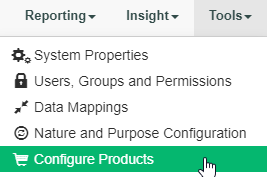
- Select Configure Products from the Tools drop down list
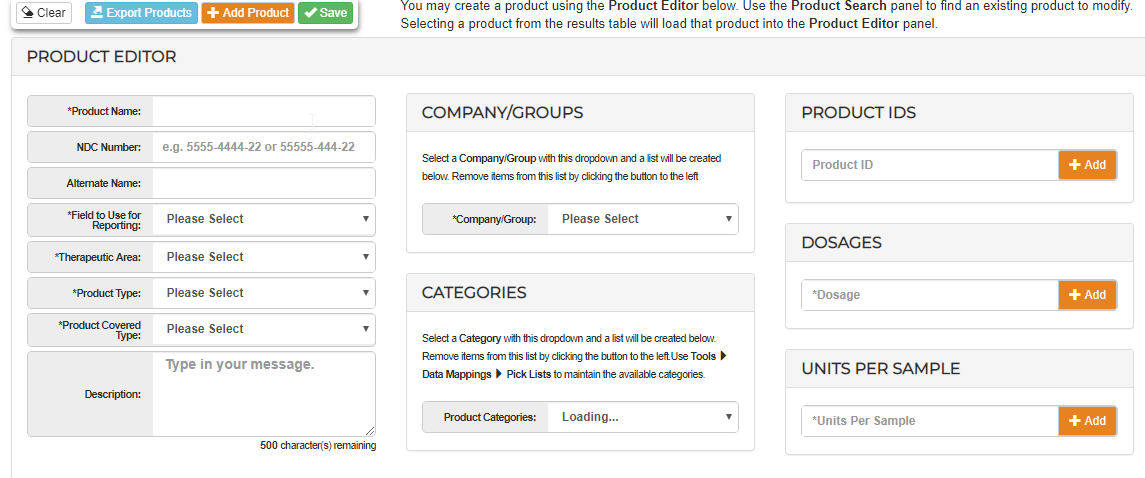
- Populate the values in the Product Editor Page.
- Mandatory fields: Product Name, Field to Use for Reporting, Therapeutic Area, Product Type, Product Covered Type
- Other values can and should be populated, however they are not mandatory
- You can isolate product lists to specific groups/subgroups within the company structure or include in all companies using the Company Group picklist here:
-
- Dosage and unit information can be added to capture sample related data if applicable
- You can also add Product IDs for your products, these are treated essentially as Alias values for your product.
*Tip - Do not use a Product ID/Alias which is identical to a product name.
- You can also add Product IDs for your products, these are treated essentially as Alias values for your product.
- Dosage and unit information can be added to capture sample related data if applicable
5. Select Save
Comments
0 comments
Please sign in to leave a comment.