
Question -
What are the user security profiles and what access do they grant a user?
Answer -
To review and edit User Security Profiles - select Tools > Users Groups And Permissions from within Transparency Solution here:
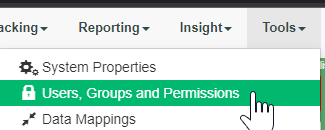
For Transparency Solution:
-Client Admin
Access to create, read update and delete data plus access to administrative tools. These are the primary top-level users in a company
-Manager
The manager role is a read-only role to provide read permissions but prevent most addition or modification of data. not typically utilized
-User
These are the lower level users in the system. They can manually create and update spend but are restricted from deletion and admin tools as well as CR creation.
-User No Edit
These are similar to “users” but are prevented from modifying data within the system. Some companies restrict data modification once added.
-Third Party
Similar to Users but with access to the clinical trial module. This role is often used by CROs or 3rd Party companies accessing the manufacturer’s MediSpend site. Customization is possible but would require development effort
-TS User Insight Dashboard
Provides access to TS insight dashboards.
- Self Only
If 'Self only' = Y, the user will always only be able to see their own data.
If Self Only = N, the user can see others spend.
This field defaults to Y when creating a user, you have to make sure to change it to 'N'.
- Company/Group Propagation
If 'Propagate' = Y, the user will have access to any company/group which is beneath their assigned company/group. Set to "N". the user would only see data entered within their company/group.
If the user is not a member of a company/group, they will not have access to the data within.
To update a user profile, or while creating a new user profile:
2) Set the 'Propagate' setting to = Y to give them access to all companies below their group in the hierarchy
3) Set the Self Only to = N, so the user can see spend from other users, as well as add spend for spend owners other than themselves.
For Engagement Manager:
- EM Compliance Admin
Has full system access with read/write access to all modules and configuration sections. Can close records in any stage of workflow, return it to requestor, change the requestor, add/remove attachments, update royalty fields, etc.
- EM Client Admin
Has full read access to all modules and configuration sections of the system
- (Module) Business Owner
Has read/write access within the module listed in the profile name. Can create and edit records in open status or close them through workflow. Can revise and duplicate previously approved records.
- (Module) Business Reviewer
Has read/write access within the module listed in the profile name where records are assigned to this user. Can review records through workflow stages and move them to the next stage of workflow.
- (Module) Business User
Provides limited access to read and update records in an open status within the module listed in the profile name - Not typically utilized
- (Module) Read Only
Provides limited access to read records within the module listed in the profile name - Not typically utilized
Other Admin profiles for EM:
- EM Admin Payment info Maintenance
Provides admin read/write access to the payment information maintenance page to add/edit/review cost center/company-code/sub-account mappings and values
-EM Vendor API
Used to integrate an inbound vendor import from a third party data provider.
-EM Analytics Accrual Analysis
Provides read access to EM Insights accruals dashboard
-EM Analytics - HCE Analysis
Provides read access to EM Insights HCE dashboard
-EM Analytics - HCE Work Activity Analysis
Provides read access to EM Insights Activity dashboard
-EM Insight Advanced
Provides read access to all EM Insight dashboards with read access to self service custom dashboards
-EM Insight - Basic
Provides read access to all EM Insight dashboards
-EM Insight Admin
Provides Read access to all EM dashboards and write access for creating and editing self service custom dashboards.
-EM Report - (Module)
provides read access to EM Insight report dashboard for specific module named in profile.
Comments
0 comments
Please sign in to leave a comment.