
Question -
I am looking to see if my Covered Recipient record in MediSpend has all of the most up to date information listed.
Is there a way to do this within the system?
Answer -
Yes! The CR compare feature allows you to compare your Internal customer master data to that of third party data providers such as NPPES, HDS, and the Validated Physicians list.
To Use CR Search/CR Compare Functionality
- Login into Medispend Transparency Reporting Solution with valid credentials.
- You will be redirected to Dashboard page.
- Navigate to Covered Recipient page
- Click 'Search' under Covered Recipients, put your criteria and search. Results will be generated, Select the CR Record by clicking 'View/Edit'.
- You will be navigated to "Add/Edit CR page".
- Click "CR Compare" button at the top of the page.'

- You will be navigated to CR Compare Page. The compare will default to searching Last Name, NPI, SLN, SLN State. Appropriate results will appear. You can change the data source by selecting the source drop downs, you may also change the search criteria in the event part of the information you currently have does not exist in HDS/NPPES.
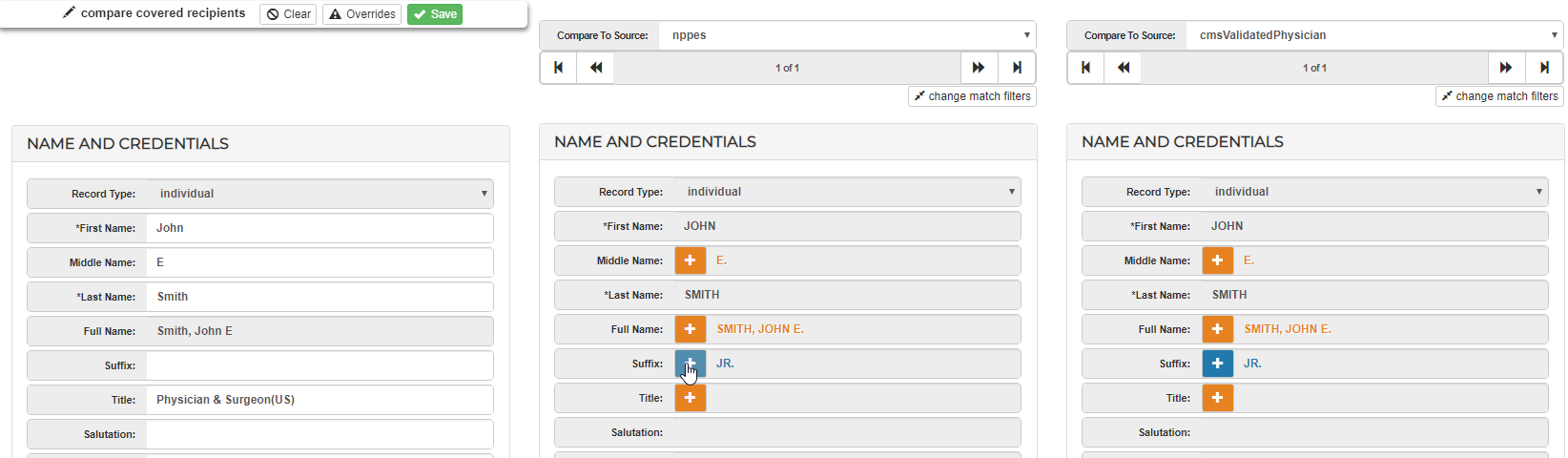
- You can then compare your data to what each third party data source shows. If you find that your record is lacking information, you can select the Orange + sign or the Blue Arrow to move the information into your customer master and update your CR record.
Comments
0 comments
Please sign in to leave a comment.